

GTA 6 launches very soon, and the all-encompassing marketing campaign for Rockstar’s upcoming behemoth continues to impress. Don’t worry, though; Rockstar hasn’t forgotten about profile customization either. The company has finally released GTA 6-themed avatars that you can apply to your Rockstar Games Account profile.
GTA 6 Profile Avatars for Rockstar Games Accounts
Rockstar Games Account has been updated with 11 new profile avatars, featuring several major characters from GTA 6.
These avatars include:
- Jason Duval
- Lucia Caminos
- Jason Duval (Mask)
- Lucia Caminos (Mask)
- Brian Heder
- Cal Hampton
- Boobie Ike
- Bae-Luxe
- Roxy
- Dre’Quan Priest
- Raul Bautista
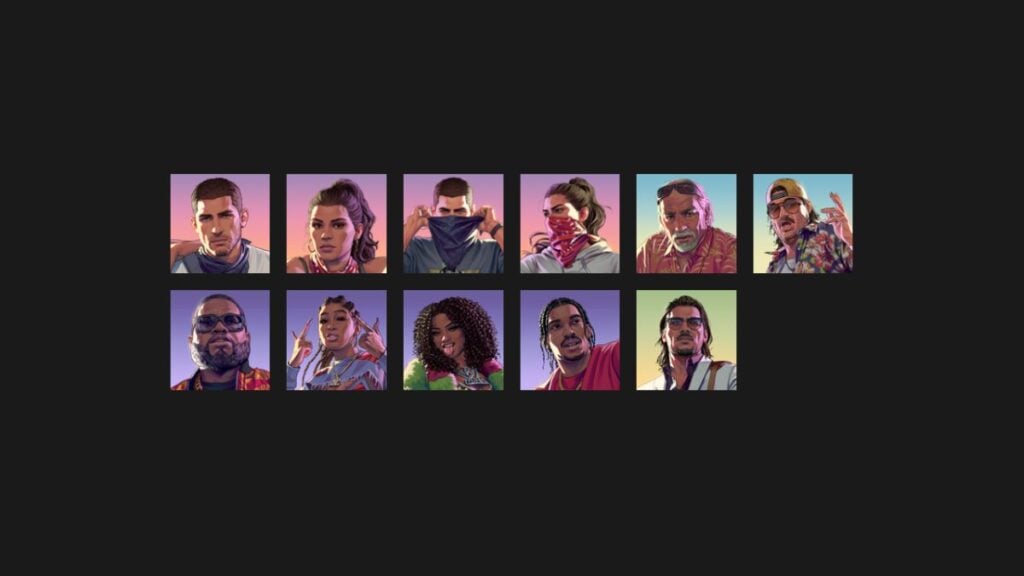
Most characters have their default promotional artwork as their profile avatar, while Jason and Lucia each get an additional masked variant.

The Vice Gazette
GTA 6 news, leaks and rumours — rounded up and sent to your inbox. No spam, unsubscribe anytime.
- Release-date and trailer news the moment it lands
- Leaks and rumours, with our credibility rating attached
- Map, character and vehicle deep-dives from the wiki
You’re on the list.
The next edition of The Vice Gazette will land in your inbox.
Get the full GTA 6 Bible experience
Daily game streaks, comments, and your rumour votes saved across devices.
It’s possible that Rockstar will add more generic icons as time goes on, especially for other major characters they’ve kept under wraps for now.
How to Update Your Rockstar Games Account Profile Avatar
Formerly known as Social Club, Rockstar’s dedicated profile management system is now simply called Rockstar Games Account. You can no longer update your profile avatar through the in-game overlay, so here are the updated steps:
- Go to the Rockstar Games Account website in your browser and log in.
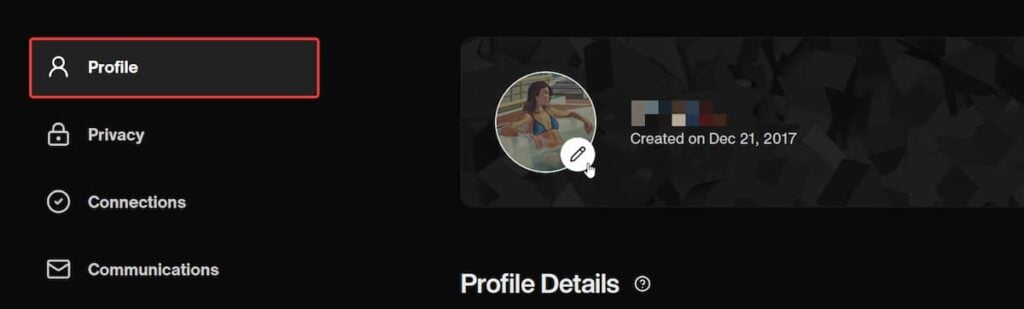
- Now, click the pencil edit button on your current avatar in the Profile tab.
- A pop-up window will open with a list of Rockstar games and a preview of their available avatars, with GTA 6 right at the top.
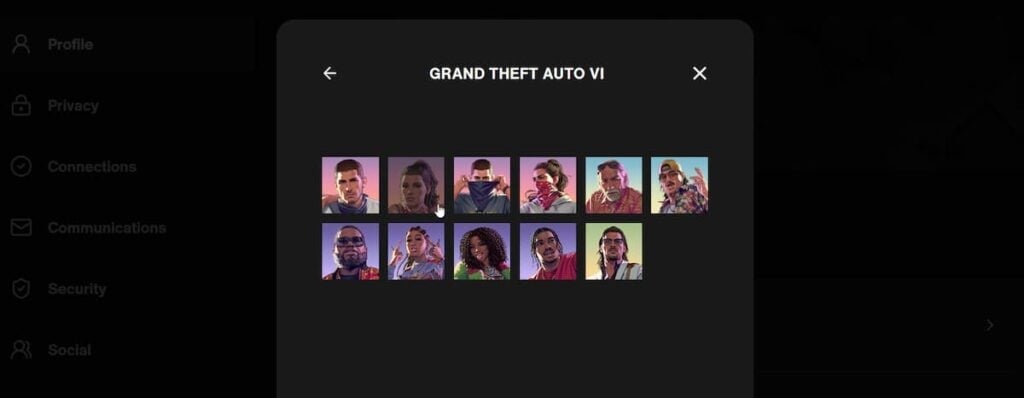
- Select GRAND THEFT AUTO VI, choose the avatar you want, and hit Save Avatar. It’ll then be applied to your Rockstar Games Account profile.
It can take a few minutes for the change to become visible across platforms, but that’s all there is to it. All avatars are completely free, and there are no restrictions on which avatar you can use or how often you can change it.
As of writing, dedicated PSN avatars for GTA 6 aren’t available yet, but I’m sure those will drop soon. Whether they’ll be paid or free is still unclear.
For unique opinions, hot takes, screenshots, and the stories behind them, and a GTA-themed banger song every week, consider joining our newsletter, The Vice Gazette.

Ask GTA 6 Bible
Questions about GTA 6 Profile Avatars Are Now Available on Rockstar Games Accounts
About the author

Ali Hashmi has been playing Grand Theft Auto since the original game and has followed Rockstar Games ever since. Whether it's replaying GTA 4 for the tenth time, getting lost in Red Dead Redemption 2, or revisiting classics like Manhunt, L.A. Noire, Max Payne 3, and even Rockstar Games Presents Table Tennis, he's always found something to appreciate in the studio's catalog. With more than eight years of games journalism experience, he now covers GTA 6 for GTA 6 Bible, writing news, guides, features, and retrospective pieces about Rockstar's games. His work has also appeared on Prima Games, Dot Esports, WhatIfGaming, GameTyrant, and The OuterHaven.
From the GAMURS Network
Network
Can You Play GTA 6 on Xbox One?

GTA 6 Details Reveal Massive Map, Smarter Cops, and 600,000 NPC Animations

Get your hands on Grand Theft Auto 6 for free over on GTA 6 Bible


Comments
No comments yet. Be the first!