


GTA 6 is rolling out in different regions across the world, starting with New Zealand on Xbox Series X|S and PlayStation 5. If you’re playing on an Xbox console, however, you might run into a “Temporary Network Problem” while trying to launch GTA 6. Here’s how you can get past that and into the game!
Fix GTA 6 Temporary Network Problem Error on Xbox
The 0x80832003 error, or “Temporary Network Error,” on Xbox consoles is fairly common with new releases, and it’s usually nothing to be alarmed about. Several users are encountering this while trying to launch GTA 6, and the workaround is pretty standard. Just keep hitting the “Try Again” button, and it should automatically resolve itself.
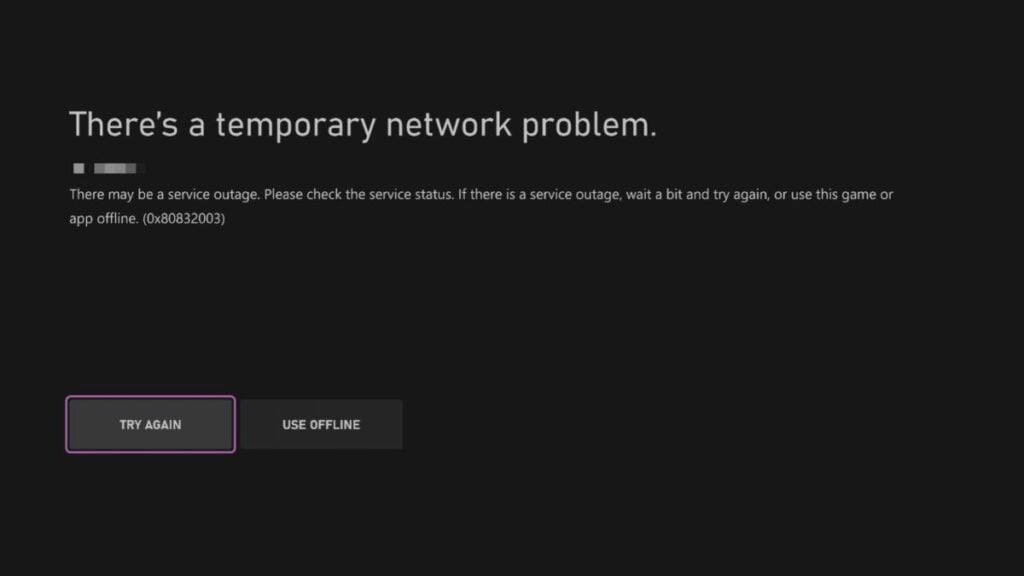
Usually, this hints at something wrong with Xbox services, and given the scale of this launch, I expect this to be fairly common, but it’s not something that requires you to do anything beyond the good ol’ “Try Again” approach.
If that doesn’t work, make sure to check Xbox’s dedicated service status page to see if everything is up and running on their end. You can also check the Rockstar Games Service Status page to see if there are any issues on Rockstar’s side.

The Vice Gazette
GTA 6 news, leaks and rumours — rounded up and sent to your inbox. No spam, unsubscribe anytime.
- Release-date and trailer news the moment it lands
- Leaks and rumours, with our credibility rating attached
- Map, character and vehicle deep-dives from the wiki
You’re on the list.
The next edition of The Vice Gazette will land in your inbox.
Get the full GTA 6 Bible experience
Daily game streaks, comments, and your rumour votes saved across devices.
You don’t need to reinstall the game, since this is a network error!
Additional Troubleshooting Steps
If you’re still running into the error, here are a few more things you can try:
- Restart your Xbox: Fully restart your console instead of simply returning to the dashboard. You can do this by holding the Xbox button on your controller, selecting Restart console, and waiting for it to boot back up.
- Check your network connection: Head to Settings > General > Network settings and select Test network connection. This will help identify any issues with your internet connection.
- Restart your router: Unplug your modem and router from the power outlet for around 30 seconds before plugging them back in. Once your connection is restored, try launching GTA 6 again.
- Try another game: See if other games and Xbox network features are working properly. If you’re experiencing similar issues elsewhere, the problem probably isn’t specific to GTA 6.
- Clear your console’s cache: Turn off your Xbox completely and unplug it from the power outlet. Wait around two minutes before plugging it back in and turning it on.
- Check your NAT type: Head to Settings > General > Network settings and check your NAT type. If it’s showing as Strict or Unavailable, you might be running into connectivity issues with Xbox services.
- Check for console updates: Head to Settings > System > Updates and make sure you’re running the latest available Xbox software.
These steps aren’t guaranteed to resolve the 0x80832003 error for GTA 6, especially if the problem is on Microsoft’s end. If nothing works, your best bet is to wait for Xbox services to recover and try launching GTA 6 again later. Though ideally, in most cases, the error should go away after a few tries of hitting the “Try Again” button.
About the author

Ali Hashmi has been playing Grand Theft Auto since the original game and has followed Rockstar Games ever since. Whether it's replaying GTA 4 for the tenth time, getting lost in Red Dead Redemption 2, or revisiting classics like Manhunt, L.A. Noire, Max Payne 3, and even Rockstar Games Presents Table Tennis, he's always found something to appreciate in the studio's catalog. With more than eight years of games journalism experience, he now covers GTA 6 for GTA 6 Bible, writing news, guides, features, and retrospective pieces about Rockstar's games. His work has also appeared on Prima Games, Dot Esports, WhatIfGaming, GameTyrant, and The OuterHaven.
From the GAMURS Network
Network
GTA 6 Details Reveal Massive Map, Smarter Cops, and 600,000 NPC Animations

Alleged GTA 6 Leaks Flood Social Media as Rockstar Issues DMCA Takedowns

Get your hands on Grand Theft Auto 6 for free over on GTA 6 Bible

Comments
No comments yet. Be the first!